
Migraine Buddy: Track Headache
Aptar Digital HealthMedical
4.810.03K Reviews
- Version
- 90.0.1787227439
- Installs
- 1.00M
- Age Rating
- Everyone
Screenshots





Our Review of Migraine Buddy: Track Headache
 Analysis by Appyee
If migraines regularly knock your plans off course, keeping a record can help turn a vague sense of “this keeps happening” into details you can discuss with a clinician. Migraine Buddy is built around that routine: logging headaches, symptoms, triggers, and sleep, then looking for patterns in what you enter. I find that focus more useful than a general wellness diary, especially for someone who wants a clearer account of how attacks affect ordinary life.
The important question is not whether any tracker can explain every migraine. It cannot. The practical test is whether logging remains manageable after the first burst of motivation—and whether the record gives you something worthwhile in return. This app has the ingredients for a useful habit, but the payoff depends on entering information consistently and treating the results as clues rather than medical conclusions.
The first week: useful structure, with a learning curve
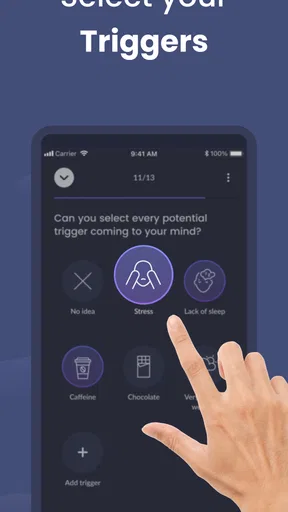
At first, the appeal is straightforward: instead of trying to reconstruct an attack from memory later, you can record it while the details are fresh. The app prompts you to note intensity, duration, symptoms, and possible triggers. That structure can help a new user notice which information is worth tracking, rather than starting with a blank notes page and wondering what to write.
There is a trade-off, though. A migraine is precisely when a detailed form can feel like one more demand. I would keep the first entries simple and focus on the details you can reliably capture. If a full log is too much during an attack, a brief record followed by a more complete note later may be a more sustainable approach than abandoning the habit because every entry cannot be perfect.
Setup is described as straightforward, and the interface is clean and intuitive, a welcome quality when migraine fog makes fiddly navigation especially frustrating. Migraine Buddy is a medical app from Aptar Digital Health. It is free to download, has an Everyone age rating, and is available on Android and iOS. Its average rating is 4.8 from around 64,000 ratings, with roughly 9,900 written reviews and over a million installs. The current version is 86.0.1768570564, and the app dates back to July 2014. Optional in-app purchases range from $0.99 to $199.99 per item, so I’d check the purchase details in the app before choosing anything that costs extra.
What a month of logging can reveal
The value builds when entries cover different kinds of days, not only the worst attacks. Recording milder headaches, sleep, and the circumstances around an episode can make the resulting picture more useful than a diary that captures only emergencies. The app lets you track possible triggers such as stress, food, and weather changes, and it can surface patterns in the information you provide. I’d treat those patterns as prompts for questions, not proof that one particular factor caused an attack.
For example, if several episodes appear near a change in sleep or around a recurring point in your routine, that may be worth discussing with a healthcare professional. One coincidence is easy to overread; a consistent record gives you a better basis for a conversation. The app also lets you note how you feel upon waking, which can make sleep-related context more specific than simply marking a night as good or bad.
A practical way to get more from the log is to choose a small set of details you can enter consistently, then add extra context when you have the energy. That approach reduces the temptation to guess at missing information days later. It also makes comparisons more fair: if you only record weather or meals when an attack is severe, those factors may look more important simply because the entries are uneven.
Sharing information without treating it as a diagnosis
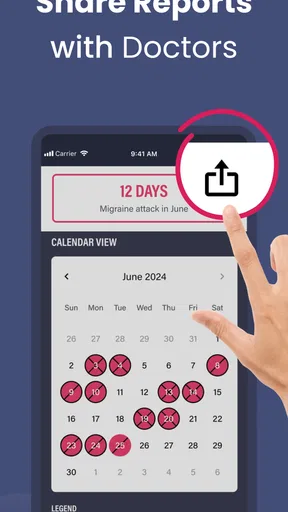
The app offers a way to share migraine logs with your doctor, which can help when an appointment is short and memory is unreliable. A concise history of timing, symptoms, and possible patterns gives you a starting point for discussing what has been happening. I’d review the log before the appointment and pick out the questions you want answered; a record is most useful when it supports a conversation rather than trying to replace one.
There is also a community feature for connecting with other people who experience migraines, along with articles and tips from health professionals. That mix can be reassuring when you want practical perspectives or a reminder that you are not the only one dealing with unpredictable symptoms. Still, other users’ experiences are not a substitute for individualized medical advice, and general tips may not fit your situation.
Keeping the habit realistic
For a realistic everyday example, imagine a workweek in which a headache begins in the afternoon, disrupts dinner plans, and leaves you unsure the next morning whether it was an isolated event. Logging the timing, symptoms, duration, and anything notable about sleep or the day gives you a record to revisit. If the same broad circumstances recur, you have something concrete to examine instead of relying on a hazy impression.
That does not mean every entry needs to become a detective exercise. I would avoid changing several routines at once just because the app highlights a possible connection; doing so makes it harder to tell what, if anything, mattered. A measured approach—record first, look for repeated patterns, then discuss meaningful concerns with a clinician—is more sensible than treating a correlation as a personal rule.
Compared with a paper diary or a basic notes app, this is more structured: the prompts make it easier to capture comparable details and review them together. A paper record may suit someone who wants no screen use during an attack, while a simple note can be better for a person who only needs a quick timestamp and a few words. The specialized tracker earns its place when you want symptom, trigger, and sleep information gathered in one migraine-focused record; it is less compelling if you dislike forms or rarely review what you enter.
Where the routine can wear thin
The main maintenance burden is not technical; it is remembering to log. If you enter details only after severe episodes, the record can miss ordinary headaches and the context that might help distinguish patterns. On the other hand, trying to record every possible influence can turn tracking into homework. I’d begin with a manageable routine and only add detail when it answers a question you genuinely have.
There is also a risk of becoming too focused on triggers. Since the app invites you to track factors such as food, stress, and weather, it can be tempting to blame a single item after one bad day. That may lead to unnecessary restrictions or worry. The useful outcome is a better-informed discussion and a clearer view of your own history, not a promise that every attack can be predicted or prevented.
The app is a stronger fit for someone who wants an ongoing migraine record, is willing to enter information regularly, and may benefit from bringing a clearer history to medical appointments. It is a weaker fit if you want an automatic solution, dislike tracking, or need immediate relief rather than a way to understand episodes over time. A clinician’s guidance remains the better option for diagnosis and treatment decisions; a tracking app can support that care, not stand in for it.
One detail to consider before committing is the free-to-download model alongside in-app purchases. You can start without paying for the download, but optional purchases are listed within a broad price range. If you prefer to avoid unexpected spending, check the purchase screen carefully and decide whether the free experience meets your needs before buying anything.
Getting Started with Migraine Buddy
First off, downloading and setting up Migraine Buddy is a breeze. Available for both Android and iOS, it’s just a matter of hitting download and going through a straightforward setup process. The app's interface is clean and intuitive, which is a big plus when you’re dealing with the fog of a migraine.
Once you’re in, the app prompts you to start logging your headaches. You can record the intensity, duration, and even the triggers and symptoms. It’s like keeping a headache diary, but way cooler. The data-entry forms are easy to use, which is a relief because, let's be honest, nobody wants to deal with a complicated app when their head is pounding.
Diving Into Features
One of the standout features is the ability to track triggers. You can log common migraine triggers like stress, certain foods, or even weather changes. The app then uses this information to help identify patterns over time. It’s like having a personal detective for your headaches.
Another nifty feature is the sleep tracker. Since poor sleep can often lead to migraines, the app allows you to monitor your sleep patterns. It’s pretty comprehensive – far more than just a basic sleep log. You can note how you felt upon waking, which is a nice touch.
Now, here’s something I found particularly useful: the app provides insights based on the data you’ve entered. Over time, you’ll start to see trends and patterns. Maybe you notice that your migraines always happen after a spicy meal or during a particular phase of your menstrual cycle. These insights can be invaluable for managing your condition.
Community and Support
Beyond just tracking, Migraine Buddy fosters a sense of community. There is an option to share your migraine logs with your doctor, which can be super helpful for medical appointments. But even more interesting is the community feature, where you can connect with fellow migraine sufferers. It’s like a support group in your pocket.
There are also articles and tips from health professionals, which are a nice addition. Whether it's advice on managing stress or dietary tips, the app offers a holistic approach to migraine management.
The User Experience
In terms of user experience, the app is pretty seamless. It doesn’t bombard you with ads or unnecessary notifications, which is a blessing when you’re already dealing with a headache. The design is sleek and modern, making navigation a breeze.
What I also appreciate is the app’s responsiveness. Updates and bug fixes seem to roll out regularly, and the developers clearly pay attention to user feedback. It feels like a living app, constantly improving and adapting to its users' needs.
Is Migraine Buddy Worth It?
So, is Migraine Buddy worth downloading? If you suffer from migraines and need a way to track and manage them, absolutely. It’s a comprehensive tool that not only helps you keep track of your headaches but also helps you understand them. The added community support and professional insights make it a well-rounded app.
In the end, while the app won't cure your migraines, it can certainly make managing them a lot easier. It’s like having a personal assistant for your head, helping you connect the dots and take control of your health. Plus, the fact that it’s free makes it a no-brainer to at least give it a shot.
In conclusion, Migraine Buddy offers a thoughtful and comprehensive approach to migraine management. It’s easy to see why it’s a favorite among migraine sufferers. So, if you’re tired of being blindsided by headaches, this app might just be your new best friend.
Verdict
Strengths of Migraine Buddy: Track Headache
- User-friendly interface for easy tracking.
- Comprehensive symptom tracking options.
- Customizable reports for better insights.
- Community support and tips available.
- Integrates with Fitbit and Apple Health.
Limitations of Migraine Buddy: Track Headache
- Some features require a paid subscription.
- May feel overwhelming for new users.
- Occasional syncing issues reported.
- Limited language options available.
- Ads can be intrusive in free version.
Similar Picks in This Category
View All
WebMD: Symptom Checker
WebMD, LLC4.1

Microphone Amplifier
DOSA Apps4.2

Anatomy Learning - 3D Anatomy
3D Medical OU4.5

Period Tracker and Calendar
SimpleInnovation4.9

GoodRx: Prescription Coupons
GoodRx4.8

CVS Health
CVS Pharmacy4.5
Frequently Asked Questions
What features does Migraine Buddy offer to track migraines?
Migraine Buddy provides comprehensive features to track migraines, including a detailed diary to log headache occurrences, triggers, symptoms, and medications. It also offers sleep tracking, weather analysis, and personalized reports to identify patterns and potential triggers. The app's user-friendly interface allows users to easily input data and monitor their progress over time.
Is Migraine Buddy suitable for all age groups?
Migraine Buddy is designed for adults and teens who experience migraines, offering features that cater to diverse needs. However, it is advisable for parents to supervise younger users to ensure accurate data input. The app's insights and reports are tailored for users who can interpret migraine patterns and consult healthcare professionals accordingly.
Does Migraine Buddy require an internet connection to function?
Migraine Buddy can function offline for data entry, allowing users to log headaches and symptoms without an internet connection. However, an internet connection is necessary to sync data across devices, access additional features like weather tracking, and receive personalized reports and insights, enhancing the overall user experience.
How secure is my personal data in Migraine Buddy?
Migraine Buddy prioritizes user privacy and data security, employing encryption and secure server protocols to protect personal information. While the app collects health-related data for analysis, it does not share this information without user consent. Users can review the app’s privacy policy for detailed information on data handling practices.
Can Migraine Buddy integrate with other health apps or devices?
Migraine Buddy can integrate with various health apps and devices, such as Apple Health and Google Fit, to provide a more comprehensive view of your health data. This integration allows users to sync sleep patterns, physical activity, and other health metrics, offering a holistic approach to managing migraines effectively.
